Throughout the first month of 2026, our ninjas added a nifty set of improvements to three useful plugins that we love: the GeoMapFish Search, OpenStreetMap Nominatim Search, and OSRM Routing plugins. These plugins all provide genuinely useful functionalities as well as being great showcases of how easy it is to integrate QField with online REST endpoints.
All three plugins have been updated to ship with useful endpoint presets out of the box, and users also have the option to configure their own custom endpoints for more flexibility. To configure endpoints, open QField’s settings panel, navigate to the plugin manager, and click the settings button next to the desired plugin.
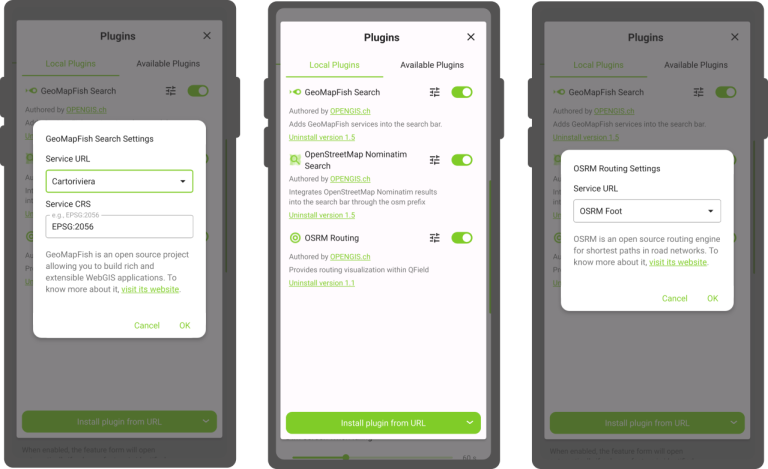
Running a public endpoint using one of these services? If you think users would benefit from having your endpoint included in the preset lists, please open a request on the relevant GitHub repositories linked above.
What are these for exactly?
For those not familiar with these plugins, let’s take a minute to review their functionalities.
GeoMapFish Search and OpenStreetMap Nominatim Search plugins offer the ability to integrate online geocoding and spatial feature searches into QField’s top search bar. When activated, these plugins appear in the search bar alongside core search components, with helpful tips on how to trigger searches via these open source services.
The OpenStreetMap Nominatim Search plugin has worldwide coverage and exposes the wealth of OpenStreetMap data through simple geocoded searches such as “pubs in London.”
The GeoMapFish Search plugin has several presets covering localities in Switzerland.
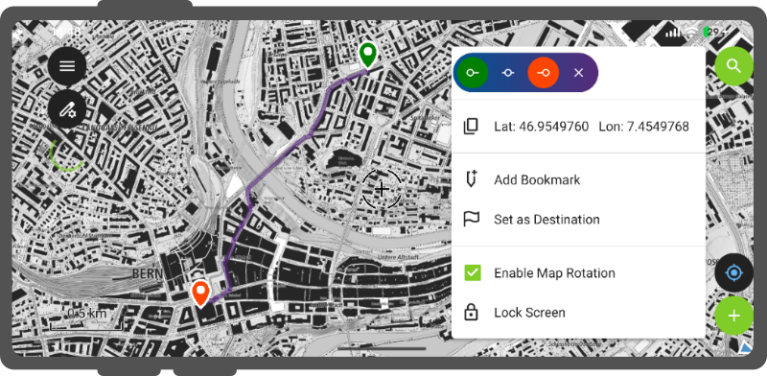
The OSRM Routing plugin initially allowed users to retrieve car routes by long-tapping on the map to set a start point, end point, and optional waypoints. The updated version now supports additional routing profiles for bicycles and pedestrians.
Interested in knowing more about plugins?
QField’s plugin framework continues to grow, with new capabilities added in each new point release. To find out more and begin writing plugins of your own, be sure to visit the dedicated API site which we launched last year to provide an overview, code snippets, and API documentation.
While we work on building a dedicated plugin repository, you can explore the growing collection of plugins on GitHub’s qfield-plugin topic page.