Here’s another QField release, packed with the features that have been at the top of professional surveyors’ wish list! (hint: it’s in the title) — plus improvements across the board for our wide range of users.
Main highlights
NTRIP & Bluetooth Low Energy
First up, NTRIP support has been added in QField unlocking sub-centimeter accuracy position readings without the need for any third-party app. This has long been requested by cadastral surveyors and other professional field workers in need of highly accurate data where being a few centimeters off can have real consequences.
To configure an NTRIP connection, simply connect to an RTK capable GNSS device via Bluetooth, BLE or TCP from the QField settings positioning panel. Once connected, the NTRIP user interface will be visible just below the positioning devices combo box in the same panel.
From there, users can enter their NTRIP caster details and enable the connection. An NTRIP visual indicator has been added at the top of the map canvas positioning information panel overlay to reflect the status of the connection. A blue dot means everything’s working, a glowing orange dot means the connection has stopped receiving correction data, and a gray dot means the connection has turned off.
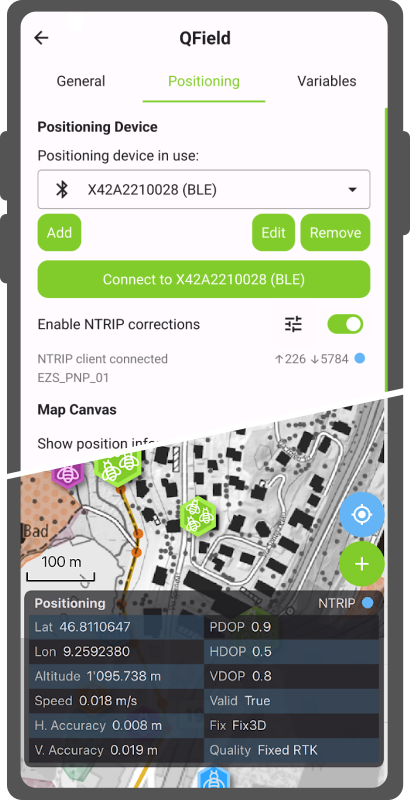
Moving onto another functionality that walks hand in hand with NTRIP: QField now supports connecting to external GNSS devices via Bluetooth Low Energy (BLE). This means a whole array of GNSS devices can now talk directly to QField on iOS as well, simplifying workflows for field surveyors working on this platform. While the benefit is most visible on iOS as QField previously lacked the ability to talk through Bluetooth altogether on that platform, BLE connections are also available on Android, Windows, and Linux. In many cases, it can offer a more stable connection.
The development of these fantastic features was supported by two QField hardware partners: HappySurvey and ArduSimple. Their support meant we were able to focus on getting the best possible experience running on their devices. Other hardware will definitively work out of the box too, and we’d love to hear about your experiences. However, since we are dealing with functionalities that are often driven by vendor-specific commands and UUIDs, there’s plenty of room to grow when it comes to compatibility. So if you’re a hardware vendor, feel free to reach out, join our certified hardware program and support QField’s growth! :)
Moving on to another noteworthy newly-added functionalities.
Feature form improvements
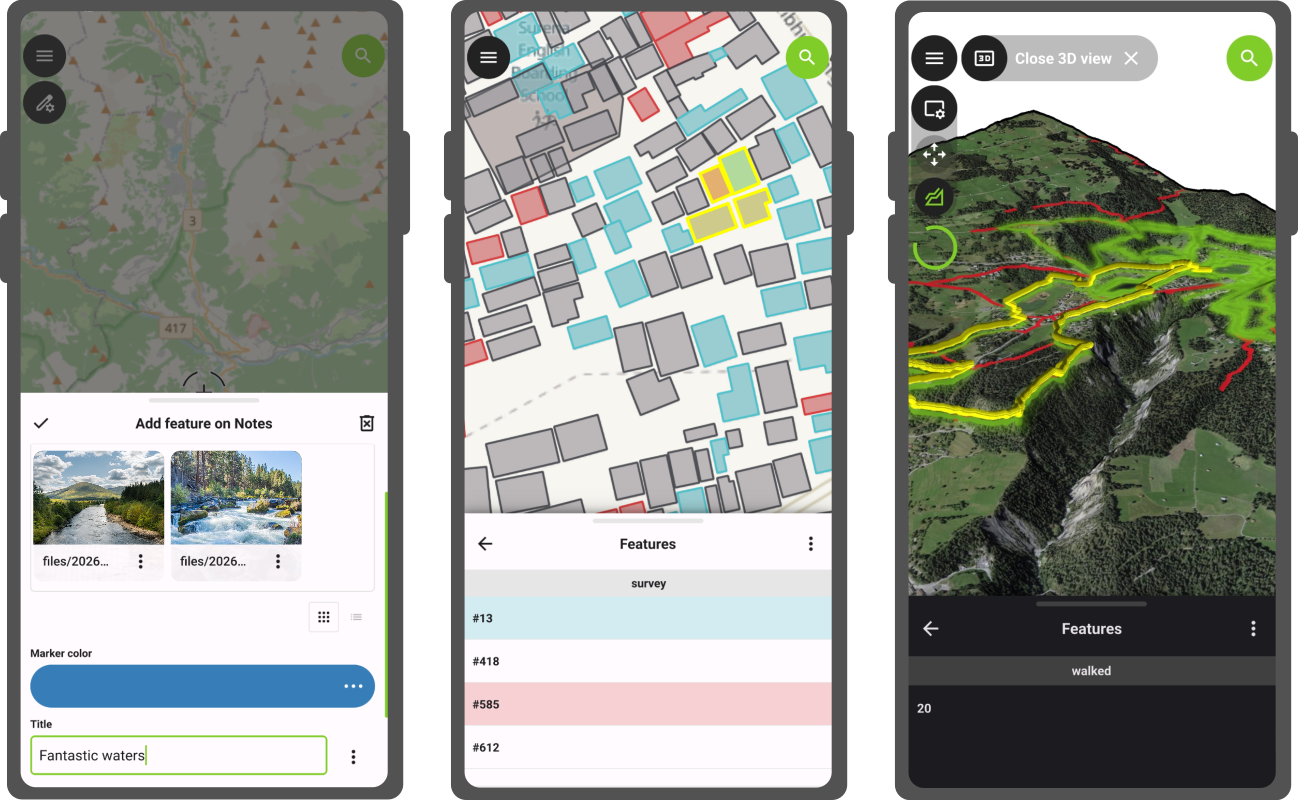
Starting with QField 4.2, the feature form includes a new gallery editor which shows previews of image, video, and audio content from relationships where the child layer has one or more attachment attributes. It will turn itself on automatically whenever QField detects this setup. The gallery editor also offers a quick snap button allowing for a much faster workflow around photo and video capture. And yes, we’ve updated our notes layer to support this when creating projects using QField.
Another feature form improvement is a wizard mode, which turns a complex set of tabs into a simple, linear flow guided by next and previous buttons that respond to constraints. driven by an easy to use pair of next and previous buttons that are reacting to constraints. The wizard mode is a per-project setting that can be enabled when setting up projects in QGIS. Simply make sure QFieldSync is installed to see the configuration panel in the project properties dialog.
Feature identification in 3D, and more
Users enjoying QField’s recent addition of 3D views will be delighted by what’s coming next. Feature identification by tapping on the terrain in 3D map views is now possible. This removes the need to switch back and forth between 2D and 3D to do attribute editing or getting more information on a nearby point of interest during 3D-enhanced hikes through your favorite national park.
There are countless more improvements that would transform this announcement into a full on essay ;) to highlight a few more:
A new project information popup accessible via the side dashboard displays crucial project metadata such as the title, the abstract description, and the author(s).
The features list now reflects attribute table’s row conditional styling configured in QGIS, providing a nice way to add visual hints to make features in need of attention pop out in the list;
Audio attachments now show a level preview that helps identify key parts of a clip during playback.
Lines and polygons digitized using a stylus in freehand mode are now smoother with cleaner geometries containing fewer redundant vertices; and
As always, the full changelog is available over here for even more goodies.
A flood of QFieldCloud improvements
This new version of QField is packed with QFieldCloud improvements. The biggest one is the retirement of the cloud projects ‘community’ tab in favor of a completely revamped – and we believe improved – experience around cloud project searching and filtering. Users can now easily filter projects by organization and teammate ownership as well as by keywords. The new user interface also makes searching through the countless cloud projects that have been made public by authors around the world far more intuitive.
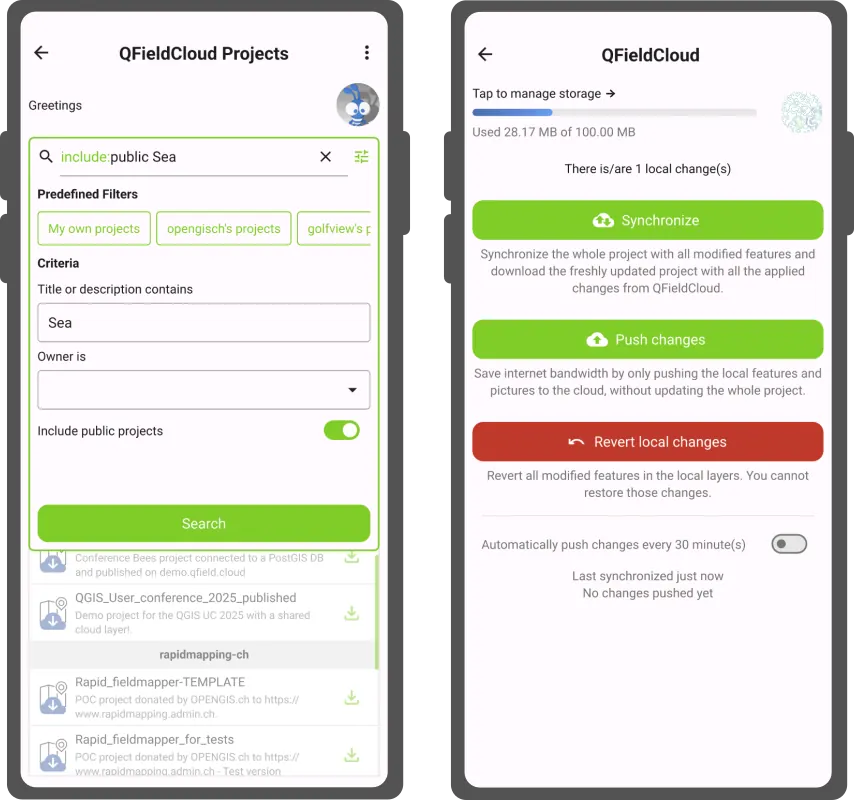
A brand new cloud storage indicator has been added to QField to let users know of their current used and remaining storage size. This will help users keep on top of their storage and provide an early warning when space is about to run out. Upgrades are available for users to keep working on these growing cloud projects that were started using the free community plan .
Beyond that, we’ve been hard at work hunting bugs and increasing the overall stability. We’ve also transformed a number of obscure and intimidating error messages into helpful notifications.
‘Coral Sea’ release name
The Coral Sea stretches across the southwest Pacific, bordered by Australia, Papua New Guinea, Solomon Islands, and Vanuatu. Home to the Great Barrier Reef and some of the most biodiverse coastal ecosystems on the planet, it is also one of the most climate-pressured, with bleaching events and coastal change outpacing many monitoring programs.
Field workers across the region are already responding with QField: mapping seagrass and mangroves for blue carbon conservation with the MACBLUE project , building national environmental monitoring capacity through SPREP’s regional GIS training , running standardized tropical field data collection at the Leibniz Centre for Tropical Marine Research , and driving land cover surveys across 10 Pacific Island nations through Digital Earth Pacific and the maplandscape project .
At OPENGIS.ch, the Coral Sea is a reminder that the places most in need of reliable field data are often the hardest to reach. That is precisely what QField is built for.
Happy field mapping!
Join the conversation